
Harness final assembly station: assembly order, pick poka-yoke, scan confirmation, first-article check
Process boundaries for assembly execution
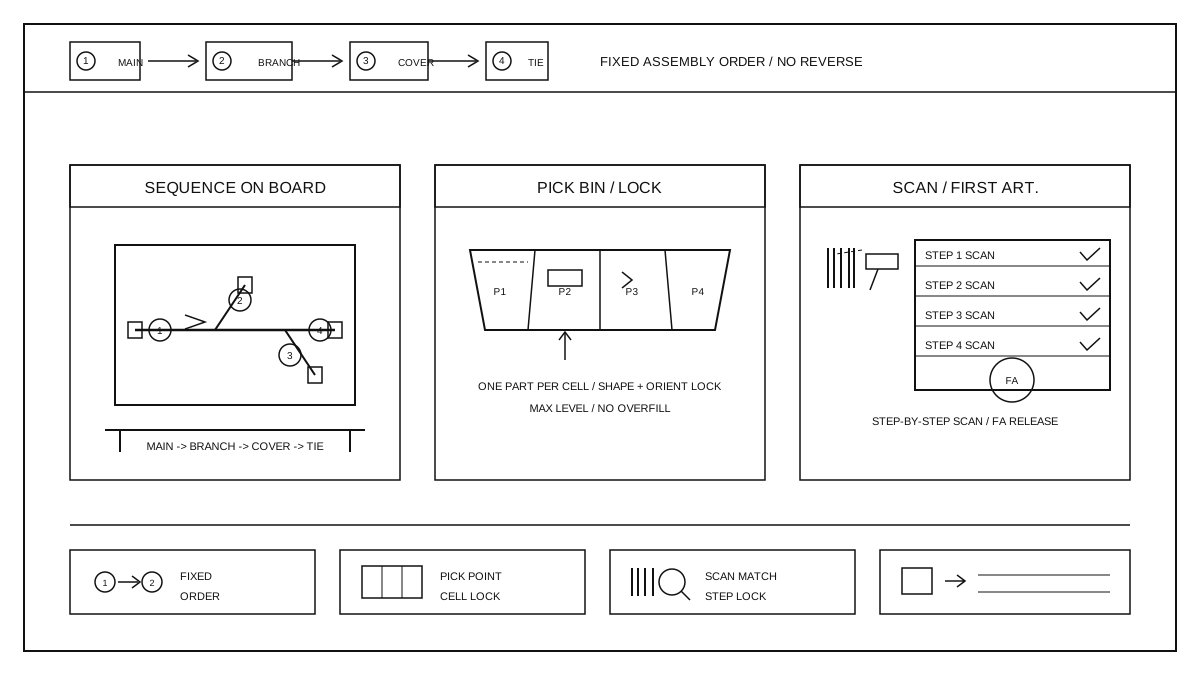
Once the entire bundle is delivered in place and pre-launch confirmation is completed, the assembly execution at the workstation officially begins. This part of the work translates the assembly sequence specified in the drawings into workstation actions: operators pick the correct parts in the correct order and assemble them in the correct positions, with verification at each step—if a step is done incorrectly, the process stops. Assembly execution does not alter the electrical or structural definition of the bundle, nor does it replace final inspection. The output consists of records of assembly actions completed according to the process documents and first-piece verification records. The assembly sequence, parts pickup points, scanning points, first-piece points, and exception points must all be clearly written in the work instructions, and the site must follow the documents without relying on verbal instructions.
Assembly Sequence and Workstation Layout
The assembly sequence is arranged according to the branching direction shown in the drawings: first secure the main trunk, then connect the branches, and finally install the protective cover and accessories. Reversing the order may cause branch interference or rework. The workstation layout divides the work surface into consecutive stations according to the assembly sequence, with each station responsible for only one segment of fastening operations, without crossing segments. The work instructions are hung directly in front of the workstation, with steps, illustrations, and pick points corresponding one-to-one. The operator's standing position, the range of hand movements, and the tool board position are set following ergonomic principles; commonly used tools are within arm's reach, while less frequently used ones are hung in fixed locations. Materials are passed between stations on material tables, with the entire bundle flowing in the sequence direction, without backtracking or crossing.
Pickup, material box, and error-prevention devices
Pick items according to the material box positions marked in the operation manual, one item per slot, one action per item, without reaching across slots to grab materials. The workstation material boxes are arranged in order of assembly, with the slots for earlier-installed parts on the convenient side and later-installed parts yielding space; each slot contains only one type of part, with the part number labeled outside the box. Error-proofing tools are shaped according to the part's outline: the material grooves for terminals, protective covers, and small parts match the part's profile, preventing wrong types from fitting; directional parts have anti-reverse edges, which will be blocked by the slot if installed incorrectly. Each slot indicates the maximum placement quantity, and exceeding it will prevent parts from being placed in the box. If a slot is missing, misaligned, or the wrong part is taken, stop immediately, verify first before continuing, and do not guess while assembling.
Scan to confirm and first article confirmation
Before each assembly operation begins, the operator first scans the barcode on the material box and the work order barcode. The system checks whether the part number, batch, workstation, and process match. Only if they match can the parts be picked for assembly. The scanned information is displayed on the terminal line by line. Material boxes that fail the check are locked and cannot be picked or assembled. At the start of each shift or after a model change, a first-piece confirmation is performed: The first piece is assembled according to the complete process, and the team leader checks the assembly sequence, branch direction, sheath position, and connector orientation against the drawings and work instructions. Only after confirming it meets the standards and recording it can the remaining pieces continue according to the same process. If the first piece is not qualified, the batch is stopped from proceeding. After the issue is resolved, a new first-piece confirmation is performed, and the old first-piece record is not reused.
Abnormal rollback, rework, and records
If a scan fails, the first piece is nonconforming, or incorrect/missing assembly is found during assembly, the entire bundle should be immediately stopped and placed in the abnormal area, with an abnormal label attached, and it should not flow to the next process. Abnormal parts are judged according to the process documentation: return to the previous process for reassembly, repair at the current station, or isolate for review. The judgment and handling process should be recorded along with the transfer card. Repairs are conducted in a dedicated repair area and should not be disassembled or modified at the assembly station; after repair, the items must go through the scan and confirmation process again and should not flow directly. Each shift, assembly abnormalities should be summarized, distinguishing whether they are due to picking errors, sequence errors, or missed scans, and corrective measures should be taken based on the cause. After changes to assembly sequence, material box positions, or scanning rules, first-piece verification should be repeated according to the validation plan. Information on downstream custom interfaces can be found at custom harness capability.