
Workstation delivery and error-proofing before harness final assembly: delivery rhythm, bin poka-yoke, scan check, pre-line release
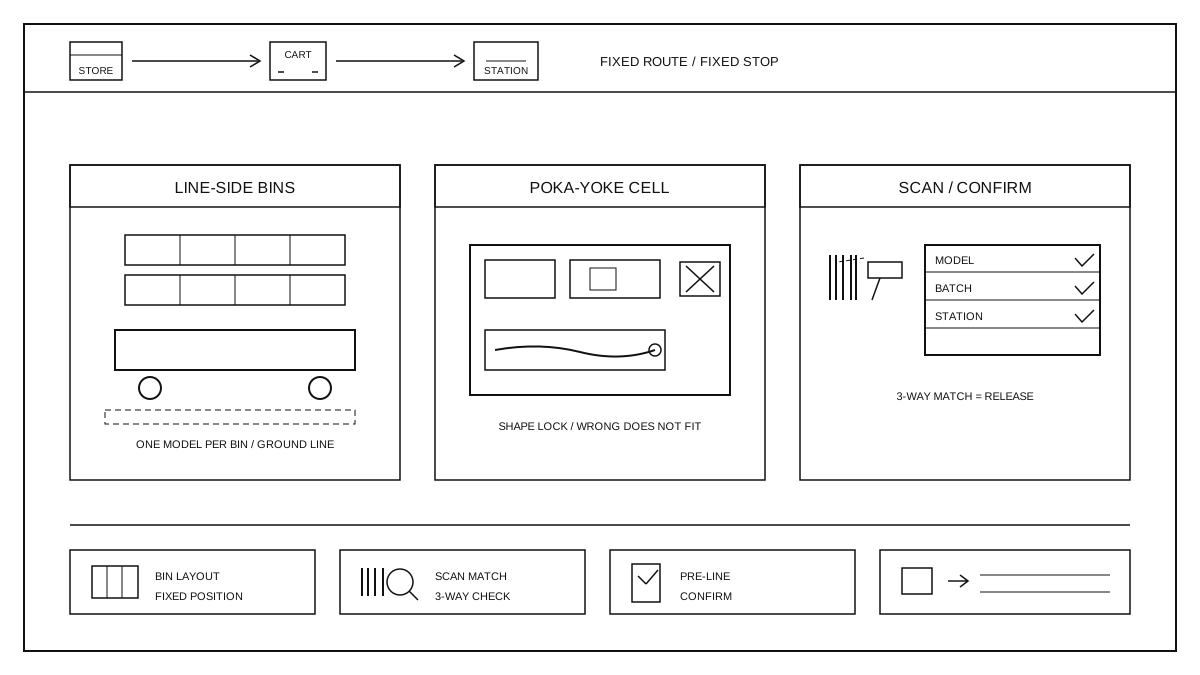
Process boundaries of delivery and error-proofing
The handling and protection of the full harness after offline processing were explained in the previous round. Here, we start from the delivery of the full harness to the line side. Workstation delivery and error prevention require sending the correct full harness and the correct branch status to the correct workstation in the correct order, and confirming before online assembly that nothing has been sent, placed, or missed incorrectly. This work does not change the electrical or physical state of the full harness itself; it only ensures that the correct parts are in the correct position and that the operator can identify correctness at a glance. It does not replace final inspection of the full harness, nor is it responsible for on-site supplementing of materials. The output is a verifiable pre-assembly confirmation record. Delivery routes, designated material box positions, scanning points, and exception points must all be clearly indicated in the process documents, and the site must follow the documents, not rely on verbal instructions.
Delivery Rhythm and Line-side Material Box Layout
Delivery is arranged according to the workstation consumption sequence and production takt time. Each full bundle is only delivered with the quantity needed by the current workstation, avoiding material accumulation in advance. Line-side material boxes are arranged from heavy to light according to the assembly sequence, with the first-installed ones placed in convenient positions and the later-installed ones making room. Each material box contains only one full bundle model or one assembly unit, with the model label attached outside the box, and floor markings indicate designated positions. The delivery cart travels back and forth along a fixed route and stopping points, aligning the stopping points with the workstation material intake without blocking the passage or covering Kanban. Line-side inventory is controlled according to the upper and lower limits specified in the process documentation; when it falls below the lower limit, replenishment is made, and when it exceeds the upper limit, delivery is suspended to avoid overfilling material boxes or mixing batches.
Error-proofing of material boxes and workstation tools
Material boxes and workstation tools are positioned according to the overall bundle shape, with each compartment holding one item to prevent adjacent bundles from being compressed or taken incorrectly. The shape of the compartment grooves is made according to the bundle envelope on the drawing; the connector and sheath ends have dedicated slots, so that once the bundle is placed in, it cannot move back and forth. Error prevention relies mainly on shape-based positioning, with color zoning as a supplement: material boxes of different models have different compartment shapes, preventing the wrong model from being inserted, while colors are only used to distinguish batches and do not replace barcode verification. The maximum placement quantity and direction are marked on the tools, and compartments cannot hold items beyond the limit. On the workstation, pre-assembled small parts, terminals, and sheaths are also positioned sequentially using compartmentalized material boxes; missing or misplaced items are considered abnormalities and should be stopped and handled immediately.
Scan code verification and pre-launch confirmation
After the entire bundle is delivered to the line side, the operator first scans the material box barcode. The system checks whether the model, batch, and workstation of the entire bundle are consistent. Only if they match can the item be taken. After the scan information, work order, and material box identification are all consistent, a visual inspection of the branch direction, sheath position, and connector orientation is conducted to ensure they match the drawings. The final confirmation before assembly: the number of material boxes matches the work order requirements, and no leftover items from the previous batch are mixed in. The verification results are confirmed item by item at the terminal. Entire bundles that fail the scan or raise doubts during manual verification are not allowed on the line. After placing the entire bundle on the workstation fixture, the placement direction and the picking sequence are confirmed again to be consistent with the work instructions, and then assembly begins.
Abnormal rollback, recording, and review
If the scan fails, there are doubts during manual verification, or material boxes are mixed in a batch, the entire bundle should be immediately stopped and placed in the abnormal area, and should not go to the workstation. Abnormal items should be tagged with an abnormal label, and record the model, batch, abnormal phenomenon, and the workstation where it was found. The team leader will determine according to the process document whether to return it to the previous step, recheck it, or isolate it. When returning, return it along with the turnover card, and do not disassemble or modify it at the line. Each shift should summarize distribution and scan anomalies, and review whether the cause is due to distribution errors, mixed material boxes, or system labeling errors, and make corrections based on the cause. After changes to the distribution route, material box layout, or scanning rules, perform first-piece confirmation according to the verification plan, without using old records. The downstream custom interface can be found at custom harness capability.